
Ask three operations managers what the difference is between an SOP and a checklist and you will get three answers and one argument. The confusion is understandable: all four of the documents below describe how work should happen, they often live in the same binder, and in many businesses the words are used interchangeably.
The distinction matters because each document does one job well and the others badly. A policy used as a checklist gets ignored; a checklist used as an SOP leaves new hires guessing; an SOP used as a policy is unenforceable. This article defines each one, shows the same task written four ways, and explains how they connect in a well-run multi-site operation. For the broader picture, see our guide to standard operating procedures.
The four documents in one sentence each
- A policy states what the organisation requires and why.
- A standard operating procedure (SOP) describes how a recurring task is performed, by whom, to what standard, and what to do when it goes wrong.
- A work instruction explains how to operate one specific piece of equipment or perform one specific step, usually in more detail than the SOP.
- A checklist is the record that each required step of an SOP was completed on a given occasion, with proof.
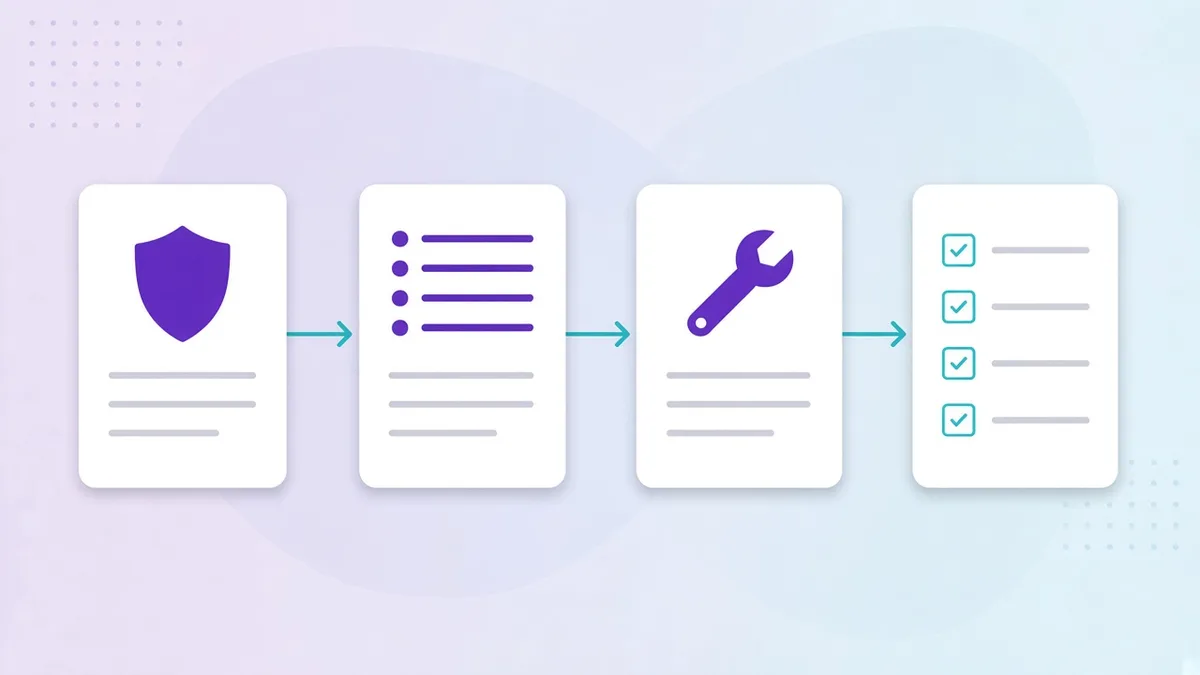
Or, as a hierarchy: policy → SOP → work instruction → checklist. Each level is more specific and shorter-lived than the one above it.
Policy: what and why
A policy is a statement of requirement. It is written by management, changes rarely, and applies everywhere.
All chilled food is stored at or below 5°C. Temperatures are checked and recorded at least four times a day. Out-of-range readings trigger documented corrective action.
It does not say who checks, which fridges, at what times, with what thermometer or what “corrective action” means. That is deliberate. A policy that specified all of that would need rewriting every time a branch bought a new fridge.
Where it goes wrong: policies printed and posted on the wall as if they were instructions. Staff cannot act on “ensure compliance at all times”. Policies belong in the handbook and in training, and every SOP should reference the policy it implements.
SOP: how, who, when, to what standard
The SOP translates the policy into a procedure a specific role can perform.
Cold-holding SOP. Kitchen team member on shift. 07:00, 11:00, 15:00 and 19:00. For each unit on the list, read the display or probe thermometer and record the temperature. Acceptable range 0–5°C. If above 5°C: move stock to a compliant unit, re-check in 30 minutes, log a corrective action with a photo, notify the shift manager. Proof: reading per unit; photo on exception; automatic user and timestamp.
It names a role, a trigger, steps, a standard, proof and an exception path. It is still generic enough to apply to every branch: it says “each unit on the list”, not “the Liebherr by the back door”.
Where it goes wrong: SOPs written as essays. If the procedure takes three pages, nobody on a Friday night is reading it. A good SOP is a numbered list with standards attached. Our SOP template shows the shape.
Work instruction: how to do one specific thing
A work instruction zooms into a single step or piece of equipment where the SOP’s one-line step is not enough.
WI-04: Calibrating the probe thermometer. Fill a cup with crushed ice and top up with cold water. Wait 3 minutes. Insert the probe without touching the sides. Reading should be 0°C ±1°C. If not, adjust using the calibration nut (photo) or replace the probe. Record the calibration in the equipment log. Weekly, and whenever dropped.
Work instructions are equipment-specific and often photo-heavy. They are referenced from the SOP step (“probe one item per category; see WI-04 for calibration”) rather than pasted into it.
Where it goes wrong: work instructions missing entirely, so the SOP step “probe the chicken” is done ten different ways; or work instructions written for every step, so the SOP becomes a manual.
Checklist: did it happen, with proof
A checklist is the SOP executed on a specific day, by a specific person, with evidence.
Cold-holding check · 11:00 · Gemmayzeh · Rami K. Walk-in: 3°C ✓ · Reach-in 1: 4°C ✓ · Reach-in 2: 2°C ✓ · Dessert fridge: 7°C ✗ → stock moved to reach-in 2, re-check 11:30: 4°C ✓, photo attached, shift manager notified 11:04.
The checklist does not explain how to do the task; it assumes you know, or that the SOP is a tap away. Its job is to be fast to complete and impossible to fake. That is why the modern checklist is a task on a phone with numeric fields, photos and automatic timestamps, not a laminated sheet with tick boxes. The difference is the subject of our article on digital checklists vs paper.
Where it goes wrong: checklists with no SOP behind them. The team ticks “fridges checked” without agreeing what checked means. Or checklists that try to be SOPs, with the full instructions repeated in every item, so they take ten minutes instead of two.
The same task, four ways
| Document | Cold-holding example | Written by | Changes |
|---|---|---|---|
| Policy | Chilled food at or below 5°C, checked four times daily, corrective action documented | Management | Rarely |
| SOP | Who, when, which units, how to read, range, exception path, proof | Operations | When the procedure improves |
| Work instruction | How to calibrate the probe in ice water; how to read this fridge’s display | Operations / supplier | When equipment changes |
| Checklist | Today’s four readings per unit, with the 7°C exception and its fix | The team, each shift | Every occurrence |
How they fit together in a multi-site operation
In a single kitchen with a long-serving chef, the four documents can live in one head. Across twelve branches in three cities they have to live in a system, and the connections between them matter more than any one document:
- The policy sets the standard and is referenced by every related SOP.
- The SOP lives in an operations library where the right roles can read it, in their language, with a short training clip. In Opscale that is the operations library.
- Work instructions are attached to the SOP steps that need them, so a team member stuck on calibration opens the instruction from the task rather than hunting for a binder.
- The checklist is the SOP’s scheduled, proof-capturing version, assigned to a role and a time: the task that appears on the opener’s phone at 06:30 in tasks and checklists.
- Exceptions from the checklist feed a logbook of corrective actions, and periodic inspections verify that the checklists reflect reality rather than habit. Opscale does this through the logbook and inspections modules.
When these are connected, three things become possible that are impossible with a binder: head office sees completion and exceptions across branches in real time, a new hire can perform any routine on day one with the instruction a tap away, and when an inspector or franchisor asks for records, the answer takes a minute.
Quick test: which document do you need?
- Staff do not know what the rule is → you need a policy, and training on it.
- Staff know the rule but do it differently at each branch → you need an SOP.
- Staff follow the SOP but one step is done wrong → you need a work instruction for that step.
- Staff do it right but you cannot prove it or see it across sites → you need a digital checklist.
Most operators we meet have policies and checklists and are missing the two in the middle. The checklists then carry a weight they were never designed for. Writing the SOPs, even just the five that matter most, is what makes the checklists trustworthy. Our seven-step method is a good place to start.